
If you're searching for a talking watch for a visually impaired senior, focus on these eight critical features. Here they are, from most to least important.
This guide helps caregivers and seniors find a reliable, easy-to-use device. You don't need technical knowledge. You just need to know what matters.
Learning how to choose the best talking watch for visually impaired seniors starts with voice clarity. Then check tactile controls, durability, display options, timekeeping, battery life, smart watch accessibility, and price.
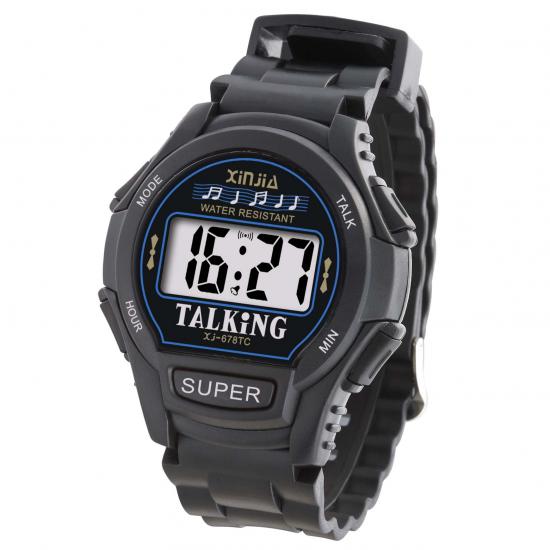
Many talking watches for visually impaired seniors also offer speech settings and backlights. A good talking watch for seniors should feel natural. The best talking watches for this group prioritize comfort and independence. Keep this checklist handy while you shop.
Loud, clear voice output with adjustable volume ensures you understand every time announcement without strain.
Large, raised buttons and a sturdy clasp let you operate the watch by touch alone.
A durable build and lightweight, adjustable strap keep the watch comfortable for daily wear.
Focus on voice clarity, tactile controls, and comfort first for the best daily experience.
When you pick up a talking watch for visually impaired seniors, the first thing you notice is how it sounds. Voice output makes or breaks the experience. If you can't understand the watch, it won't help you. Let's explore what makes voice output work well for a talking watch for seniors.
A talking watch for seniors needs loud, clear audio. Many seniors have some hearing loss. A soft or muffled voice defeats the purpose. Look for adjustable volume controls. You want to turn it up in a noisy room. You want to turn it down in a quiet one. This flexibility matters greatly. The best watches offer several volume levels. You can find the perfect setting for any environment. Some models even push a maximum volume that cuts through loud background noise.
A clear male voice often works best for this group. Deeper tones cut through background noise. They also sound more natural. Some watches let you choose between voice options. Pick the one that sounds clearest to you. Voice clarity is essential for everyday use. You should understand every word without repeating the announcement.
Voice clarity also matters for time announcements. You don't want to strain to hear the hour. You want instant understanding. A good watch announces the time crisply. It doesn't rush through words. It speaks clearly enough that you catch every syllable on the first try. This directness saves you time and frustration.
Many watches also include voice reminders for important tasks. These reminders use the same clear audio system. Set them for medication, appointments, or wake-up calls. Each reminder comes through with the same clarity you expect from the time function. You can rely on these reminders throughout your day.
Beyond volume, look for adjustable speech speed. Some seniors process spoken information more slowly. A fast voice leaves them confused. Adjustable settings let you slow down or speed up the voice. This control over speech speed directly affects clarity. A slower speed helps with comprehension. A faster speed works for quick checks. You decide what suits you best. Some watches offer three speed options. Others offer continuous adjustment from slow to fast.
A natural-sounding voice makes the watch feel friendly. Robotic voices can be hard to understand. They feel less personal. A natural-sounding voice puts you at ease. It sounds like someone is actually telling you the time. The clarity of each spoken word matters more than any extra feature. The voice should feel like a helpful companion, not a machine.
Adjustable settings let you customize the experience. You might want a slower pace in the morning. You might want a faster pace later. The best talking watches for visually impaired seniors offer this flexibility. You can change settings as your needs shift throughout the day.
One standout feature is setting different volumes for different modes. Alarms can be louder. Time checks can be softer. This customization makes your daily routine more pleasant. You control the sound profile for every situation.
All these audio controls work together. You get a device you can rely on every day. A talking watch for seniors with excellent voice output gives you independence. You no longer need to ask others for the time. The watch speaks to you clearly, on your terms.
A talking watch for visually impaired seniors must work by touch alone. You cannot rely on sight to find the right button. The design should feel natural in your hand. Every control needs a distinct shape and position. This approach delivers true easy operation for daily wear.
The buttons on a talking watch for seniors need to be big and raised. You should feel them without looking. Raised tactile markers help you tell one button from another. Some watches put a dot on the time button. Others use a different shape for the alarm. These small cues make a huge difference. You can press the right control on the first try.
Button simplicity matters for everyone. A watch with too many buttons confuses the user. Look for a model with just a few clear controls. One button for the time. One for the alarm. Maybe one for volume. That is all you need. This simple layout supports easy use throughout the day. You won't waste time fumbling with tiny switches.
A sturdy latch and hinge protect the watch and keep it on your wrist. The clasp should open and close with one hand. You should not need help from a caregiver. A weak latch pops open during movement. A strong one stays secure. Test the hinge before you buy. It should feel solid, not loose or wobbly.
Independent opening and closing gives you control. You can put the watch on in the morning without assistance. You can take it off at night on your own. This independence is a key feature of a well-designed talking watch for visually impaired users. The latch should click into place with a clear sound or feel. That feedback tells you the watch is secure. Look for metal hinges over plastic ones. Metal lasts longer and holds its shape. These tactile features make the watch a reliable companion for daily routines.
A talking watch for visually impaired users takes a beating every day. You bump it against doorframes. You wear it in the rain. You knock it on tables without thinking. The build quality decides how long your watch lasts. It also decides how good it feels on your wrist hour after hour.
Look for a stainless steel case or a tough alloy body. These materials resist scratches and dents far better than cheap plastic. A mineral glass face adds another layer of protection. It shrugs off the small impacts that happen during normal wear. You want a watch that still looks decent after a year of steady use.
Water resistance matters too. You wash your hands. You get caught in a storm. A watch with decent water resistance keeps working through all of it. Check the rating before you buy. Even basic splash protection extends the life of your talking watch for seniors.
The strap material deserves the same attention. Leather feels nice but wears out fast with sweat and moisture. Silicone or woven nylon holds up better over time. These materials also dry quickly. That keeps your wrist dry and comfortable.
Weight affects comfort more than you might expect. A heavy watch drags on your wrist all day. It tires your arm. It shifts around when you move. Look for a lightweight model that sits still. You should almost forget you have it on.
An adjustable strap gives you a custom comfort and fit. Your wrist size changes with the seasons. It swells in summer heat. It shrinks in winter cold. A strap with several holes or a sliding buckle adapts to those changes. You get a snug fit without pinching.
The strap should also be easy to swap. Some models let you pop on a new band without tools. That feature helps when your strap wears out. You replace the band instead of the whole watch. This small design choice saves you money and extends the life of your device.
Good comfort and fit keep you wearing the watch every day. That daily use builds a habit. You check the time on your own. You stay independent. A durable, comfortable talking watch for visually impaired seniors supports that routine for years.
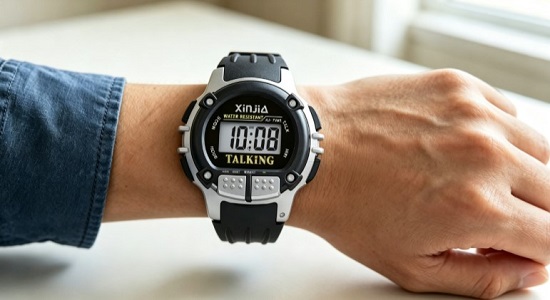
Some talking watches for visually impaired users include a visual display as a backup. This feature helps if you have partial sight. It also helps caregivers confirm the time. You may not need a display at all. Still, a good one adds value for many people.
A useful display shows dark numbers on a light background. This contrast makes the digits pop. You can read them without squinting. Low contrast washes out the numbers. High contrast keeps them sharp and clear.
Large digits matter just as much. Small numbers force you to lean in close. Large ones let you glance and go. A large lcd display works well for this purpose. The bigger the digits, the easier your daily check becomes.
A large lcd display also reduces eye strain. You spend less time decoding each number. You simply see it and move on. That speed supports your independence. A large lcd display turns a quick glance into a simple task.
Lighting changes throughout the day. You check the time in a dark bedroom. You look at your wrist in a dim hallway. A backlight keeps the display readable in these moments. Without it, the screen goes dark and useless.
Look for a backlight that activates with a button press. You should not need to fumble in the dark. One touch should light up the screen. This design keeps the display practical for nighttime use.
Some models offer adjustable brightness. You can dim the light for bedtime checks. You can brighten it for outdoor shade. This flexibility makes the display work in any setting. A talking watch for seniors with a backlit display covers more situations. You get clear information day or night.
You want a talking watch for visually impaired seniors that always shows the right time. Quartz movement delivers that reliability. It uses a small battery-powered crystal that vibrates at a precise frequency. This technology keeps your watch accurate to within seconds each month. You do not need to reset it often. Reliable timekeeping is one of the essential features of any good talking watch. That dependability matters for your schedule. You take medication at specific hours. You need to catch buses or attend appointments. A quartz movement handles all of these situations without drifting. You depend on it daily.
Some watches include atomic time sync as a premium upgrade. These models connect to a radio signal that corrects the time automatically. They adjust for daylight saving changes too. You never touch the controls. The watch fixes itself. This feature adds convenience if you live within signal range. But standard quartz movement works perfectly for most people. It gives reliable performance without extra cost or complexity. A talking watch for seniors with quartz accuracy supports your independence. You trust the time it announces. You plan your day around it.
Accurate timekeeping also supports reminders for medication or appointments. You can set a daily alarm for wake-up calls. Voice reminders announce each task clearly at the right moment. Each reminder arrives at the exact time you programmed. You never miss a beat. The watch becomes your reliable companion throughout the day.
Complicated setting procedures frustrate users. You want a watch you can set without a manual. Look for models with clear instructions printed on the device or included in large type. The best designs use a straightforward sequence. You press one button to enter setting mode. You turn a crown or press another button to change the numbers. The watch announces each value as you adjust it. You confirm the correct time with a final press. This simplicity makes the initial setup quick. It also makes seasonal time changes easy.
A talking watch for the visually impaired should keep its settings when you change the battery. Some models lose the time during a swap. That forces a full reset. Avoid those watches. Choose one with memory backup. This ease of setting gives you confidence from day one. You set the time once. You can use it without frustration. A simple setup reduces errors. You set it correctly once. The watch stays correct for months. That reliability supports your routine without hiccups.
You do not want to worry about your talking watch for seniors dying in the middle of the day. Battery life and charging methods directly affect how well the watch fits your routine. A dead battery means missed reminders and lost independence. Let's look at what keeps your watch running.
Most talking watches for visually impaired users rely on replaceable coin-cell batteries. These small batteries last a long time under normal conditions. You swap them out when they die. You do not need to plug anything in. This design keeps things simple for daily use.
The Atomic Talking Watch for Seniors is powered by a replaceable battery and can provide up to 1 year of battery life under normal use, with no charging required, making it practical for daily use by seniors and visually impaired users.
That one-year lifespan means you change the battery about once a year. You spend less time on maintenance. You spend more time enjoying your watch. Some models use rechargeable batteries instead. Those need more frequent charging. They also require a cable or dock. Replaceable batteries win for simplicity in most cases.
If your watch uses a replaceable battery, changing it should be easy. Look for a battery compartment with a simple latch or screw cover. You should open it without special tools. The watch should keep its time settings during the swap. Memory backup prevents you from resetting everything.
Rechargeable models need a different approach. Look for magnetic charging cables that snap into place. You do not need to align tiny plugs. A magnetic connection makes the process foolproof. Some models offer wireless charging pads. You just set the watch down. It charges without any cables at all.
A low-battery warning helps you plan ahead. The watch announces a voice reminder when power runs low. You get time to find a replacement battery. You avoid sudden shutdowns. This feature keeps your daily reminders on track. You never miss a medication alert or appointment because of a dead battery.
Simple charging and long battery life keep your talking watch for visually impaired users ready every day. You stay independent. You stay on schedule.
Many blind seniors now wear smartwatches instead of traditional talking watches. These devices pack powerful accessibility tools. You can pair them with your phone for a richer experience. Let's explore what makes a smartwatch work well for low vision.
A smartwatch needs a screen reader to announce everything on the screen. VoiceOver on Apple Watch reads aloud menus, notifications, and messages. You hear each item as you swipe. This audio feedback turns a visual device into a talking watch for visually impaired users. You can check the time, read texts, and manage voice reminders without seeing the screen.
Screen reader compatibility also extends to your phone. Many seniors pair their watch with a smartphone for setup and adjustments. The phone's screen reader mirrors the watch settings. You change volume, speech speed, and notification preferences from either device. This connection keeps everything in sync. You manage your talking watch for seniors with familiar controls.
Android users rely on TalkBack for spoken feedback. TalkBack announces buttons, alerts, and screen changes. You navigate by touch and sound. This system works on Wear OS smartwatches. You get the same hands-free access as VoiceOver users.
Beyond screen readers, look for display enhancements. Magnification lets you zoom in on small text. High contrast fonts make words stand out against the background. Color inversion flips light and dark areas for better visibility. Bold text adds weight to letters. Removing animations reduces visual clutter and motion sickness. These features help you use the display when you have partial sight.
A smartwatch display with these tools supports your daily routine. You check appointments, read messages, and set reminders. The watch adapts to your needs. Whether you choose a traditional talking watch for visually impaired users or a smartwatch, accessibility comes first.
When learning how to choose the best talking watch for visually impaired seniors, price and warranty matter just as much as features. A cheap watch saves money upfront but leads to frustration later. The best talking watch balances cost with essential features. Voice clarity comes first. Tactile controls come second. Displays and extras stay optional. This focus gives you the best value for your money.
Prices range from under $50 for basic models to over $200 for premium smartwatches. A mid-range talking watch for seniors offers the best value. You get clear audio, durable build, and reliable timekeeping. You also get warranty protection for your purchase.
Standard warranty periods for electronic devices like talking watches often range from 1 to 2 years. The exact warranty terms (e.g., coverage scope, claim process) should be clarified directly with the chosen supplier before finalizing the purchase agreement.
A longer warranty signals quality from the maker. It also protects your investment if something breaks.
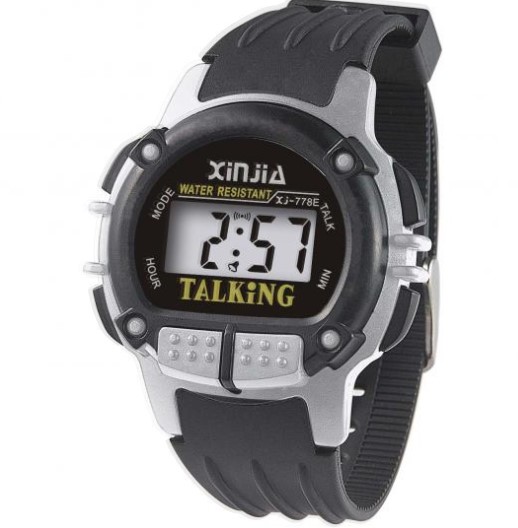
Xinjia produces some of the best talking watches. These best talking watches earn praise for voice clarity and accuracy. Users also note button stiffness and support gaps. If you want the best talking watch for daily needs, Xinjia delivers. Here is feedback about Xinjia talking watches for visually impaired seniors:
|
Pros |
Cons |
|---|---|
|
Auditory time confirmation – helps visually impaired users |
No water resistance beyond splashes |
|
Tactile button mapping – easier for seniors with limited dexterity |
Shorter battery life |
|
Multi-language support – accommodates diverse users |
Bulkier case (11.5mm) |
|
Simple setup (no app) – low technical barrier |
No sports metrics |
The pros outweigh the cons for most users. You get auditory time confirmation and tactile mapping. These features make daily use practical. Set reminders for medication or appointments. The watch announces each one clearly.
Xinjia offers a 12-month limited warranty covering manufacturing defects. Coverage applies globally, but claims must be processed through the seller or authorized distributor where purchased — not directly with Xinjia.
Xinjia covers your purchase for one year. Keep your receipt. All Xinjia watches use 20mm lug width and standard spring bars. Swap the band if needed. For a premium option, consider the Voice GRUS GPS Talking Watch. It adds GPS tracking at a higher price. For most seniors, Xinjia delivers the best value.
You now know how to choose the best talking watch for visually impaired seniors. Keep this quick checklist handy: voice clarity, tactile controls, durable build, readable display, reliable timekeeping, long battery life, smartwatch accessibility, and fair price with warranty.
Voice clarity, tactile controls, and comfort matter most. These three features make a talking watch for seniors easy to use every day. The rest add ease and extra value.
Take this guide shopping with you. Compare models side by side. Remember, the best talking watches depend on personal preference. Some seniors want reminders and speech settings. Others prefer simple buttons and nothing more.
Find the watch that speaks to your needs and gives your senior independence. A talking watch for visually impaired users should feel like a helpful companion, not a gadget. You deserve that clarity and comfort every single day.
Voice clarity tops the list. You need to hear every word without straining. A loud, clear voice with adjustable volume makes the watch useful all day. Without that clarity, other features lose value. Start your search there.
Many models do. You can set voice reminders for medication, appointments, or wake-up calls. Each reminder announces at the right time. This feature supports your daily routine. Check the product details before you buy.
Look for high contrast and large digits. A backlight helps in low light. Test the display brightness in different settings. If you have no usable vision, skip the display and focus on audio and tactile controls instead.
Yes, if you want extra features. Smartwatches offer screen readers, magnification, and bold text. They also handle messages and apps. But they cost more and need charging. A simple talking watch offers comfort and ease without the complexity.
Check voice clarity, button size, and strap comfort. Confirm battery life and warranty terms. Read user feedback about durability. These checks help you find the best talking watch for your needs. Take your time comparing options.