



Finding the right watch for a visually impaired senior can feel overwhelming. You struggle with tiny buttons, unclear displays, and complicated settings. This guide provides a clear framework to cut through the confusion. The ideal talking watch offers clear voice announcements, a large display, and automatic time setting.
These features promote independence by reducing daily hassle. Many models now include easy-to-use straps and emergency alerts, improving accessibility. For those seeking low vision watches, a digital display with backlight works best. With this guide, you can confidently choose a watch that truly helps.
Key Takeaways
-
Choose a watch with automatic time setting to remove manual adjustments and ensure accuracy.
-
Pick a comfortable strap with a magnetic or Velcro clasp for easy fastening with arthritic hands.
-
Select a digital display with a clear voice announcement to read time without mental effort.
-
Use safety features like fall detection and medication reminders for peace of mind and independence.
Automatic Time Setting for Your Talking Watch
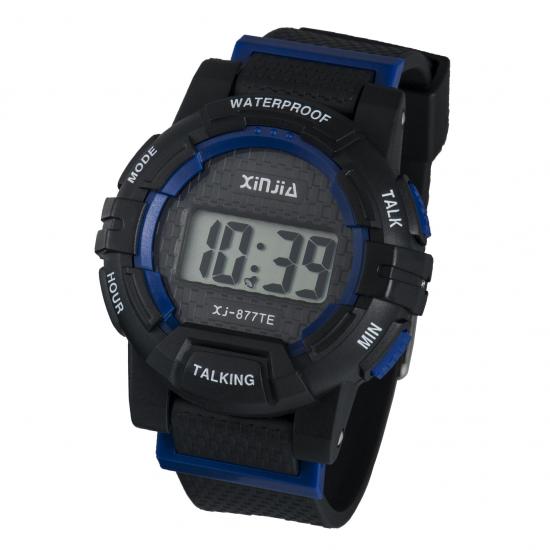
Manual time adjustment creates a significant barrier for seniors with low vision or arthritis. Tiny buttons, small dials, and complex setting sequences turn a simple task into a daily frustration. Automatic time setting eliminates this problem entirely.
The watch synchronizes itself with an official time source. You never touch a button to set the hour. You never worry about daylight saving time changes. The watch handles everything overnight while you sleep.
Accuracy Without Manual Adjustment
Radio-controlled technology forms the backbone of modern automatic timekeeping. These watches receive signals from atomic clocks maintained by national standards laboratories. The watch compares its internal time against the broadcast signal. It then corrects any discrepancy automatically. This process happens silently and without user intervention.
Talking Atomic Clocks use radio signals to automatically set themselves to match official US Atomic Clock Time and date. This automatic setting eliminates the need for manual adjustment, which is often error-prone for elderly users with visual impairments, thereby ensuring the clock displays the precise official time without requiring user intervention.
The practical benefits extend far beyond convenience. A watch that sets itself always displays the correct time. You never second-guess whether the display shows the right hour. You never wonder if the watch stopped during the night. The radio signal corrects drift continuously. This reliability builds trust. A senior can depend on the watch without hesitation.
For caregivers, automatic setting removes a recurring responsibility. You no longer visit weekly to adjust the time after a power outage or battery change. You no longer receive confused phone calls about incorrect displays. The watch maintains accuracy independently. This independence supports the broader goal of promoting self-sufficiency for visually impaired seniors.
Radio-Controlled and Atomic Models
Several manufacturers produce radio-controlled watches specifically designed for this audience. These models combine atomic timekeeping with accessible features. The LCD Radio Controlled Talking Watch for Visually Impaired, Elderly or Blind exemplifies this category. Its key features include:
-
Radio-controlled atomic timekeeping for automatic accuracy
-
Talking feature that announces the time audibly for users with visual impairment
-
Design explicitly created for elderly and visually impaired users
-
Alarm and auto-date functions for daily scheduling
-
40 mm dial diameter providing a larger display for easier readability
This combination of features addresses the core challenges of low vision accessibility. The audible announcement confirms the time without requiring visual confirmation. The larger dial reduces eye strain. The automatic setting removes the most difficult manual task.
When you evaluate different models, consider the signal reception in your area. Radio-controlled watches require adequate signal strength to synchronize. Most models receive signals at night when interference is minimal. The watch typically attempts synchronization during early morning hours. You wake to a perfectly accurate time display every day.
The cost of radio-controlled models varies considerably. Basic units remain affordable for most households. Premium models add features like multiple alarm settings and extended battery life. For facilities purchasing multiple units, bulk order digital talking wrist watch options provide cost savings. Similarly, wholesale talking watch for seniors programs help care homes equip every resident with reliable timekeeping.
The investment pays dividends through reduced caregiver burden and increased user confidence. A watch that maintains perfect accuracy without intervention becomes an invisible assistant. It provides the correct time whenever needed. This reliability forms the foundation of a truly accessible timekeeping solution. Choose a radio-controlled model, and you eliminate the most common source of watch-related frustration for visually impaired seniors.
Strap and Case Comfort for Seniors
A watch that causes skin irritation or proves difficult to fasten defeats its purpose. You need a strap and case designed for aging hands and sensitive skin. The right materials prevent rashes and discomfort. The right clasp system reduces frustration during daily wear. Together, these features make a talking watch genuinely usable.
Materials for Arthritis and Sensitive Skin
Skin becomes thinner and more reactive with age. Standard metal straps often trigger contact dermatitis or allergic reactions. Medical-grade silicone offers a safer alternative. This material is non-irritating and dermatologist-tested.
It minimizes allergic reactions and suits sensitive, aging skin perfectly. Titanium cases provide another excellent option. Titanium is hypoallergenic and non-reactive. It reduces contact dermatitis risk while remaining durable and lightweight for daily wear.
|
Material |
Key Property |
Relevance to Elderly Users |
|---|---|---|
|
Medical-grade silicone |
Non-irritating, dermatologist-tested |
Minimizes allergic reactions; suitable for sensitive, aging skin |
|
Titanium |
Hypoallergenic, non-reactive |
Reduces contact dermatitis risk; durable and lightweight for daily wear |
The strap's flexibility matters as much as its material. A thin, flexible band is easier to manipulate than a rigid, bulky one. You can bend it comfortably around the wrist without awkward hand positions. The case itself should sit comfortably without causing pressure points. A compact design proves easier to grip and handle with reduced hand strength. These ergonomic considerations directly support accessibility for seniors with limited dexterity.
Easy-Fasten and Magnetic Clasps
Traditional buckles require two hands and fine motor threading. For someone with arthritis, this simple task becomes a daily struggle. Velcro closures solve this problem effectively. They reduce the need for complex hand movements. You can fasten and unfasten the strap effortlessly, enabling independent dressing without assistance.
Magnetic clasps offer another practical solution. They eliminate the requirement for intricate hand movements entirely. Users report they are easy to put on with one hand. The self-closing mechanism engages from a 10–15 mm gap, meaning the magnet grabs without precise alignment. Opening requires a maximum force of 2.0 kg (4.4 lbs), well within reduced grip strength capabilities.
|
Comparison Dimension |
Magnetic Clasp Evidence |
Implication for Seniors |
|---|---|---|
|
Accessibility |
Ideal for limited hand strength; easy one-hand operation |
Reduces required dexterity significantly |
|
Speed |
Faster to fasten than traditional clasps |
Reduces time and frustration during dressing |
|
Security |
Risk of coming undone if snagged |
May not suit all daily activities |
|
Alignment |
Difficulty aligning noted initially |
Requires some residual coordination |
|
User Rating |
Dual-magnet system rated 4.6/5 by seniors |
High satisfaction among target users |
Large, easy-to-press buttons complete the ergonomic package. Buttons must be oversized and require minimal force to operate. This design consideration ensures the watch remains functional even with reduced hand strength.
For facilities equipping multiple residents, a bulk order digital talking wrist watch with these features provides consistent quality. Similarly, a wholesale talking watch for seniors program ensures every resident benefits from accessible design. The right strap and case transform a simple timepiece into a dependable daily companion.
Digital vs. Analog Talking Watch Displays
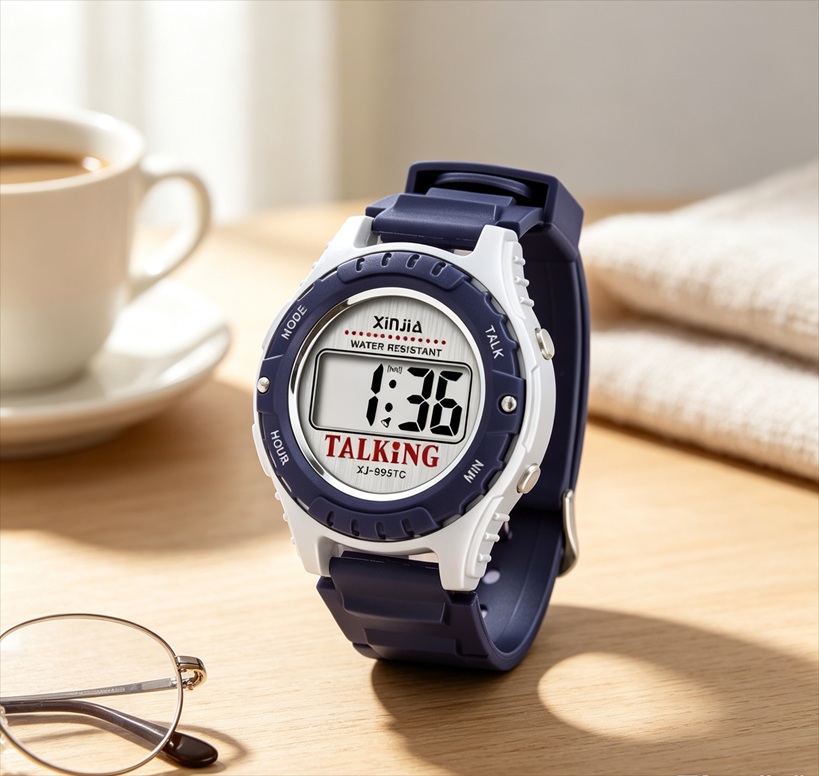
The display type directly affects how easily a senior reads the time. Analog clocks require mental translation. You must interpret hand positions and understand their relationship to numbers. Digital displays eliminate this step. They present time as plain numbers. For seniors with cognitive decline, this difference matters enormously.
Digital Displays for Dementia Patients
Clinical studies confirm that cognitive decline impairs analog clock reading more severely than digital clock reading. The impairment arises from loss of semantic memory about clocks. Patients forget how hour and minute hands work together.
Advanced dementia adds visuospatial dysfunction. The patient cannot map hand positions to time values. Reduced number recognition compounds the problem. Digital displays avoid all these obstacles. They show the time directly. A user sees "2:15" rather than interpreting a hand pointing at a number. This simplicity reduces confusion.
A talking digital watch combines visual clarity with spoken confirmation. You hear the time announced clearly. You see the numbers on the screen. This dual input reinforces understanding. Even if the user cannot read the numbers, the voice provides the information. This approach makes the watch usable for seniors with varying degrees of vision loss and cognitive impairment. The watch becomes a dependable daily companion rather than a source of frustration.
Digital displays also support time teaching watches for caregivers who need to reinforce time concepts. When a senior sees the exact numbers and hears them spoken, the learning process becomes easier. The watch serves as both a tool and a teacher. Choosing a talking watch with a digital display ensures maximum usability for dementia patients.
Clear Voice Announcement Feature
Voice announcement transforms a standard watch into an accessibility device. The watch speaks the time at the press of a button. No squinting at tiny numbers. No struggling with dim lighting. You simply press and listen. The announcement confirms the time without requiring any visual effort.
Clarity matters more than volume in voice announcement. A clear, well-enunciated voice prevents misunderstanding. The watch should use a natural speaking pace. Rushed or garbled speech defeats the purpose. Look for models that allow volume adjustment. Some models offer a choice between male and female voices. This personalization helps the user feel comfortable with the device.
The voice feature works alongside the digital display. You can use both senses together. This combination helps seniors confirm the time without doubt. For caregivers, this feature provides peace of mind. You know your loved one can always access the time, regardless of their vision level. The combination of digital display and voice announcement creates a truly accessible timekeeping solution.
Reminders and Safety Features for Peace of Mind
A talking watch delivers more than accurate timekeeping. Modern models include features that protect your loved one and alert you to potential problems. The Xinjia SureSafe watch exemplifies this integration. It combines automatic time setting, a comfortable design, clear digital voice announcements, medication reminders, and fall detection. This combination directly addresses the core needs of visually impaired seniors by merging everyday usability with crucial safety features.
Programmable Medication and Appointment Alerts
Forgetting medication doses poses a serious risk for seniors managing multiple prescriptions. A talking watch with programmable alerts eliminates this concern. You set the alert times during the initial setup process. The watch then announces the reminder at the programmed hour. The user hears a clear voice stating the time and the purpose of the alert. This audio confirmation removes the need to read a screen. The spoken message leaves no room for confusion.
The watch retains these alerts even after a battery change. You program the schedule once, and the device handles the rest. This feature proves especially valuable for medication regimens with several daily doses. The watch reminds the user at each interval without fail. Caregivers gain peace of mind knowing their loved one receives timely reminders even when they cannot be present. The watch does not require daily attention from a family member or nurse.
Appointment alerts serve a similar function for medical visits and social activities. You program the date and time of the appointment. The watch announces the reminder in advance, typically one hour before the event. This prompting helps seniors maintain their schedules independently. They no longer need someone to call and remind them. The combination of medication and appointment alerts transforms the watch into a personal assistant that supports daily living.
Fall Detection and Emergency Alarm Buttons
Fall detection technology adds another layer of protection. The watch monitors movement patterns continuously. It distinguishes between normal activities and actual falls. Research indicates that no technology is foolproof. Accuracy depends on device type and placement. The Apple Watch performed poorly in testing, detecting only hard falls. Most elderly falls involve a mix of soft and hard impacts. A device that misses softer falls provides a false sense of security.
Research indicates that wrist-worn devices are less accurate than belt- or necklace-worn devices because natural arm movements can trigger false alarms, directly impacting the reliability of fall detection in watches for elderly users.
The emergency alarm button provides a manual override. You press the button to alert a caregiver immediately. This feature covers several critical scenarios:
-
The person has fallen and cannot get up
-
They have not moved for over an hour
-
They need medical attention for any reason
This button provides peace of mind for caregivers who worry about their loved one's safety while at work or on vacation. The alarm reaches a designated contact or monitoring service. The response happens quickly. For the senior, the button reduces the need to rely on others for help. It gives them independence and confidence to move through their daily routine. The knowledge that help is one button press away reduces anxiety for both the senior and their family.
The Xinjia SureSafe watch checks all these boxes. It offers automatic time setting, a comfortable strap, clear digital voice, medication reminders, and fall detection. You can evaluate this model against the framework in this guide to make a confident choice. For facilities considering multiple units, a bulk order digital talking wrist watch from a wholesale talking watch for seniors program ensures consistent quality across all residents.
You now have a clear framework for selecting the right talking watch. Choose automatic time setting to eliminate manual adjustments. Pick a comfortable strap with easy-fasten clasps for arthritic hands. Select a digital display with clear voice announcements. Include safety features like fall detection and medication reminders.
|
Feature |
Independence Benefit |
|---|---|
|
Auto-adjusting time |
No manual setting needed |
|
Easy straps |
Slip on without struggling |
|
Voice announcements |
Check time without visual effort |
|
Reminders & fall detection |
Safety net for emergencies |
People aging with vision impairment benefit greatly from voice-controlled technologies. These tools support independence in daily tasks, from medication reminders to controlling smart home devices.
The Xinjia SureSafe watch integrates all these elements. Use this framework to evaluate your options. Make a confident choice that promotes independence.
FAQ
How does the watch announce the time?
Press a button, hear the time spoken clearly. Volume adjusts to your preference. Some models offer male or female voices. The announcement works alongside the digital display for dual confirmation.
Can a talking watch help someone with dementia?
Yes. Digital displays show plain numbers without mental translation. The voice announcement reinforces what you see. This dual input reduces confusion and helps seniors confirm the time independently.
How reliable is fall detection on a wristwatch?
Wrist-worn devices detect hard falls but may miss softer impacts. Natural arm movements can trigger false alarms. The emergency button provides a manual backup you can press anytime.
What happens if the radio signal is weak in my area?
Most watches attempt synchronization overnight when interference is minimal. If the signal fails, the watch continues keeping accurate time internally. It retries automatically the next night.
Can I buy multiple watches for a care facility?
Yes. A bulk order digital talking wrist watch ensures consistent quality across all residents. A wholesale talking watch for seniors program helps care homes equip every resident with reliable timekeeping.
